LaTeX에선 테이블을 작성하기 위한 다양한 패키지들을 제공한다.
◾ array
◾ tabular
◾ tabularx
◾ tabu
◾ tabularray
| 장점 | 단점 | |
| `tabularray` | ◾ 내용에 따라 높이도 조정 가능 ◾ 다중행이 포함한 표 간단히 작성 ◾ 편리한 가로 조절 ◾ 편리한 행 합치기 |
1. 기본적인 table의 형태
\begin{center}
\begin{tabular}{c c c}
  a11 & a12 & a13 \\
  a21 & a22 & a23 \\
\end{tabular}
\end{center}
1)tabular
(a) LaTeX에서 Table을 만드는 기본적인 방법
(b) option: {c c c}
- 작성할 테이블에는 3개의 컬럼이 존재함.
- 각각의 컬럼들은 텍스트들이 각 컬럼의 중앙에 존재
LaTeX table의 예시들
1. 예시 1
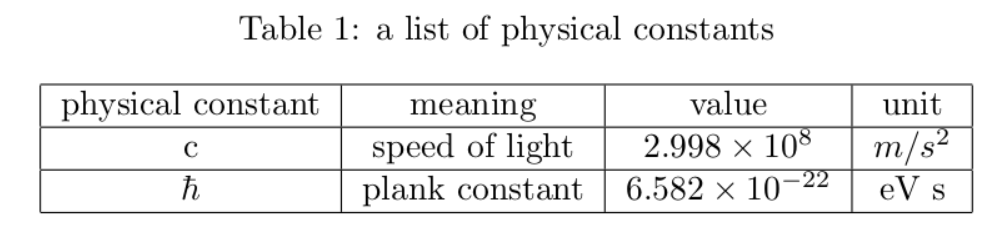
\begin{table}[h]
    \caption{a list of physical constants}
    \begin{center}
        \begin{tabular}{|c|c|c|c|}
            \hline
                physical constant  & meaning           & value              & unit     \\
            \hline
                c                  & speed of light    & $2.998\times 10^8$ & $m/s^2$  \\
            \hline
                $\hbar$            & plank constant    & $6.582 \times 10^{-22}$ & eV s \\
            \hline
         \end{tabular}
    \end{center}
\end{table}
- 결과
2. tabularray 패지키
\begin{tblr}[옵션]{필수설정지정}
a11 & a12 \\
a21 & a22 \\
\end{tblr}
◾ 옵션:
| `&` | 셀구분자 |
| `\\` | 행구분자. |
| `\hline` | - 수평선 - 행구분자 뒤에 작성. ex: `\\ \hline` |
| `\cline{n-m}` | n 칼럼에서 m 칼럼까지 수평선을 그음 |
◾ 필수설정지정
'컴퓨터 & IT (Computer & IT) > LaTeX' 카테고리의 다른 글
| [LaTeX] ris 파일을 bib로 변환하기 (0) | 2021.05.13 |
|---|---|
| [LaTex] 수식 만들기 (0) | 2021.05.06 |
| [LaTeX] BibTeX 설치 및 사용방법 (1) | 2021.03.22 |
| [LaTex] 행렬 및 배열 만들기 (0) | 2021.03.22 |
| [LaTeX] LaTeX 배포판과 에디터의 차이점 (1) | 2020.12.26 |


댓글